
Writing Information to Windows Event Logs using .NET Framework
TLDR
- Use
EventLog.SourceExiststo check if a source exists; if not, useEventLog.CreateEventSourceto register it. - There is a one-to-one relationship between
SourceandLogName; oneSourcecan only be bound to oneLogName. - If you need to change the
LogNamebound to aSource, you must delete the old source and create a new one, and you must restart the computer for the changes to take effect. - After creating a custom log, you must reopen "Event Viewer" to see the log in the interface.
Basic Operations and Source Registration for Event Logs
In .NET Framework, the System.Diagnostics.EventLog class is the core for handling Windows event logs. Note the following two key parameters during operation:
- Source: Identifies the application name.
- LogName: Specifies the log category where the event is written.
When you might encounter this: When an application attempts to write to an event log for the first time, or when you need to categorize events into a specific log.
string source = "MySource";

// Check if the Source exists; if not, create it
if (!EventLog.SourceExists(source)) {
    // LogName can be 'Application', which will be associated with the Application category
    EventLog.CreateEventSource(source, "Application");
}

// Write a message
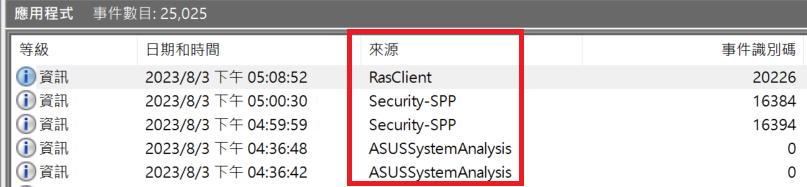
EventLog.WriteEntry(source, "MyMessage");

// Another way to write
using (EventLog log = new EventLog()) {
    log.Source = source;
    log.WriteEntry("MyMessage");
}
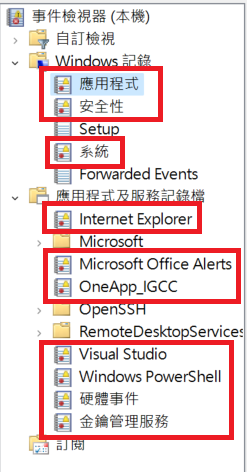

TIP
The WriteEntry() method supports EventLogEntryType and EventID parameters, which can be used to set the event level and identifier.
Custom Log Names
If an application needs to write logs to a custom log file, you can specify the LogName when calling CreateEventSource.
When you might encounter this: When a developer wants to manage logs for a specific application separately from the system's default Application Log.
string source = "MySource2";

if (!EventLog.SourceExists(source)) {
    EventLog.CreateEventSource(source, "MyLogName");
}

EventLog.WriteEntry(source, "MyMessage");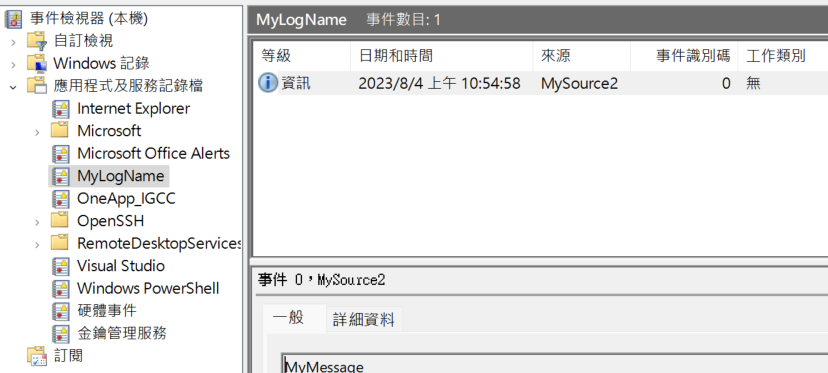
WARNING
After creating a new custom log, you must reopen "Event Viewer" to see the log in the interface.
Limitations on Changing Source and LogName Associations
If you attempt to change the LogName bound to an existing Source, simply deleting and recreating the source via code is not enough.
When you might encounter this: When the application architecture is adjusted and you need to migrate existing event sources to a different log.
string source = "MySource";
string logName = "MyLogName";

if (EventLog.SourceExists(source)) {
    string oldLogName = EventLog.LogNameFromSourceName(source, ".");
    if (oldLogName != logName) {
        EventLog.DeleteEventSource(source);
        EventLog.CreateEventSource(source, logName);
    }
} else {
    EventLog.CreateEventSource(source, logName);
}

EventLog.WriteEntry(source, "MyMessage");WARNING
According to MSDN documentation, if a source is already mapped to a log, you must restart the computer after remapping for the changes to take effect. Otherwise, messages will still be written to the old log.
References
Change Log
- 2023-08-04 Initial version created.